
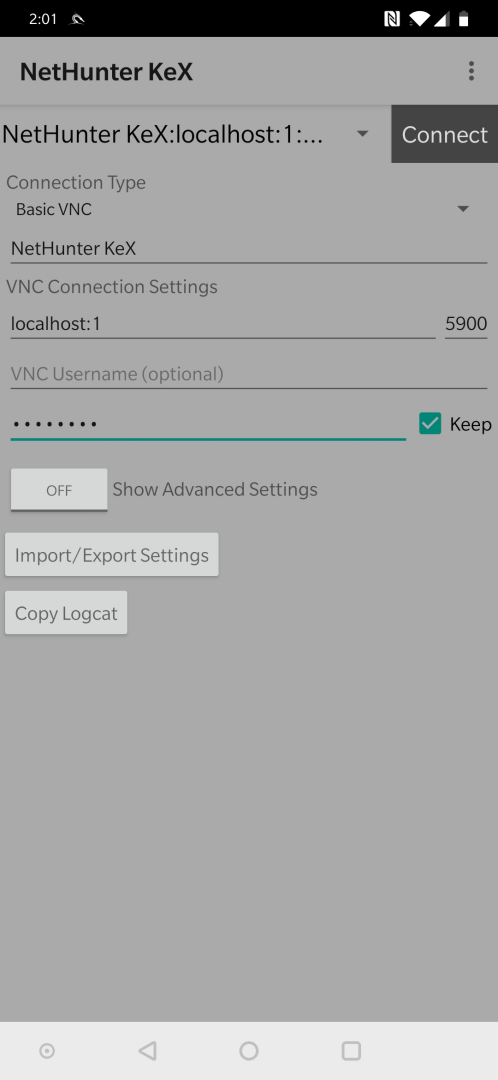
Customized version of bVNC for NetHunter KeX
Please support my hard work and GPL open-source software by giving me a high rating and telling all your friends about this project! You can also donate to the project by getting bVNC Pro.
If bVNC doesn't work for you, before writing a review, please post your question in the forum:
https://groups.google.com/forum/#!forum/bvnc-ardp-aspice-opaque-android-bb10-clients
See below for instructions for Windows, Linux, and Mac OS X.
If you need an RDP application, please search for aRDP in Google Play. In addition, a SPICE client named aSPICE is available. Finally, if you are an oVirt, RHEV, or Proxmox user, check out Opaque.
bVNC is a secure, open source VNC client. Its features include:
- Windows, Mac, Linux, BSD, or any other OS with a VNC server installed
- Master password support in the Pro version
- Multi-factor (two-factor) SSH authentication in the Pro version
- Multi-touch control over the remote mouse. One finger tap left-clicks, two-finger tap right-clicks, and three-finger tap middle-clicks
- Right and middle-dragging if you don't lift the first finger that tapped
- Scrolling with a two-finger drag
- Pinch-zoom
- Force Landscape, Immersive Mode, Keep Screen Awake
- Dynamic resolution changes, allowing you to reconfigure your desktop while connected, and control over virtual machines from BIOS to OS
- Full rotation - use the central lock rotation on your device to disable rotation
- Multi-language
- Full mouse support
- Full desktop visibility even with soft keyboard extended
- SSH tunneling, AnonTLS and VeNCrypt for secure connections (does not support RealVNC encryption).
- High-grade encryption superior to RDP using SSH and VeNCrypt (x509 certificates and SSL), preventing man-in-the-middle attacks
- AutoX session discovery/creation like NX client
- Tight and CopyRect encodings for quick updates
- Ability to reduce the color depth over slow links
- Copy/paste integration
- Samsung multi-window
- SSH public/private (pubkey)
- Importing encrypted/unencrypted RSA keys in PEM format
- Zoomable, Fit to Screen, and One to One scaling modes
- Two Direct, one Simulated Touchpad, and one Single-handed input modes
- In single-handed input mode, long-tap to get a choice of clicks, drag modes, scroll, and zoom
- Supports most VNC servers including TightVNC, UltraVNC, TigerVNC, and RealVNC
- Supports Mac OS X built-in remote desktop server (ARD) and Mac OS X authentication
- Does NOT support RealVNC encryption (use VNC over SSH or VeNCrypt instead)
- Stowable on-screen keys
- Right-click with Back button
- D-pad for arrows, rotate D-pad
- Hardware/FlexT9 keyboard support
- View-only mode
- On-device help on creating a new connection in the Menu when setting up connections
- On-device help on available input modes in the Menu when connected
- Hacker's Keyboard is recommended
Please support my hard work and GPL open-source software by giving me a high rating and telling all your friends about this project! You can also donate to the project by getting bVNC Pro.
If bVNC doesn't work for you, before writing a review, please post your question in the forum:
https://groups.google.com/forum/#!forum/bvnc-ardp-aspice-opaque-android-bb10-clients
See below for instructions for Windows, Linux, and Mac OS X.
If you need an RDP application, please search for aRDP in Google Play. In addition, a SPICE client named aSPICE is available. Finally, if you are an oVirt, RHEV, or Proxmox user, check out Opaque.
bVNC is a secure, open source VNC client. Its features include:
- Windows, Mac, Linux, BSD, or any other OS with a VNC server installed
- Master password support in the Pro version
- Multi-factor (two-factor) SSH authentication in the Pro version
- Multi-touch control over the remote mouse. One finger tap left-clicks, two-finger tap right-clicks, and three-finger tap middle-clicks
- Right and middle-dragging if you don't lift the first finger that tapped
- Scrolling with a two-finger drag
- Pinch-zoom
- Force Landscape, Immersive Mode, Keep Screen Awake
- Dynamic resolution changes, allowing you to reconfigure your desktop while connected, and control over virtual machines from BIOS to OS
- Full rotation - use the central lock rotation on your device to disable rotation
- Multi-language
- Full mouse support
- Full desktop visibility even with soft keyboard extended
- SSH tunneling, AnonTLS and VeNCrypt for secure connections (does not support RealVNC encryption).
- High-grade encryption superior to RDP using SSH and VeNCrypt (x509 certificates and SSL), preventing man-in-the-middle attacks
- AutoX session discovery/creation like NX client
- Tight and CopyRect encodings for quick updates
- Ability to reduce the color depth over slow links
- Copy/paste integration
- Samsung multi-window
- SSH public/private (pubkey)
- Importing encrypted/unencrypted RSA keys in PEM format
- Zoomable, Fit to Screen, and One to One scaling modes
- Two Direct, one Simulated Touchpad, and one Single-handed input modes
- In single-handed input mode, long-tap to get a choice of clicks, drag modes, scroll, and zoom
- Supports most VNC servers including TightVNC, UltraVNC, TigerVNC, and RealVNC
- Supports Mac OS X built-in remote desktop server (ARD) and Mac OS X authentication
- Does NOT support RealVNC encryption (use VNC over SSH or VeNCrypt instead)
- Stowable on-screen keys
- Right-click with Back button
- D-pad for arrows, rotate D-pad
- Hardware/FlexT9 keyboard support
- View-only mode
- On-device help on creating a new connection in the Menu when setting up connections
- On-device help on available input modes in the Menu when connected
- Hacker's Keyboard is recommended

كوكةكصةحا
RépondreSupprimerززووواا
Supprimerم) م) م) م) ظظ! ظظ99999666-66488466-878مذمذم) 6+6+66+6++6-6+666-6-6-66-66-6-676766676766776677676767676677676677667667676767666666-6+6+6-6-6-66-6-
Supprimerمصطفى
RépondreSupprimerمصطفى
Supprimerسفيان مبروك
Supprimerعع
RépondreSupprimerGooog
RépondreSupprimerصصص
RépondreSupprimerيرلللا
RépondreSupprimerعرزرااا
RépondreSupprimerMid fir
RépondreSupprimerCc
RépondreSupprimerTooop
RépondreSupprimerHsla
RépondreSupprimerhttps://www.facebook.com/profile.php?id=100059686673421&mibextid=ZbWKwL
RépondreSupprimerhttps://www.facebook.com/profile.php?id=100060036397860&mibextid=ZbWKwL(2)
Supprimerhttps://m.facebook.com/Alimohammed198?mibextid=ZbWKwL&wtsid=rdr_0EIysyBEypBl2lNWk((3)) 👟
RépondreSupprimerghlati.info@gmail.com
RépondreSupprimerCe commentaire a été supprimé par l'auteur.
RépondreSupprimer