Latest Apps and Games
thumbnail

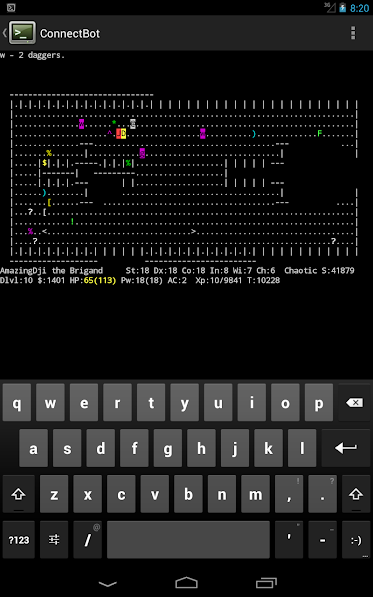
ConnectBot


Download

ConnectBot is a powerful open-source Secure Shell (SSH) client. It can manage simultaneous SSH sessions, create secure tunnels, and copy/paste between other applications.

This client allows you to connect to Secure Shell servers that typically run on UNIX-based servers.

This app is built and signed by Kali NetHunter


thumbnail

cSploit


Download


cSploit is a free/libre and open source (GPLed) Android network analysis and 
penetration suite which aims to be the most complete and advanced professional toolkit for IT security experts/geeks to perform network security assessments on a mobile device.


See more at www.cSploit.org.
Features

Map your local network
Fingerprint hosts' operating systems and open ports
Add your own hosts outside the local network
Integrated traceroute
Integrated Metasploit framework RPCd
Search hosts for known vulnerabilities via integrated Metasploit daemon
Adjust exploit settings, launch, and create shell consoles on exploited systems
More coming
Forge TCP/UDP packets
Perform man in the middle attacks (MITM) including:
Image, text, and video replacement-- replace your own content on unencrypted web pages
JavaScript injection-- add your own javascript to unencrypted web pages.
password sniffing ( with common protocols dissection )
Capture pcap network traffic files
Real time traffic manipulation to replace images/text/inject into web pages
DNS spoofing to redirect traffic to different domain
Break existing connections
Redirect traffic to another address
Session Hijacking-- listen for unencrypted cookies and clone them to take Web session
thumbnail

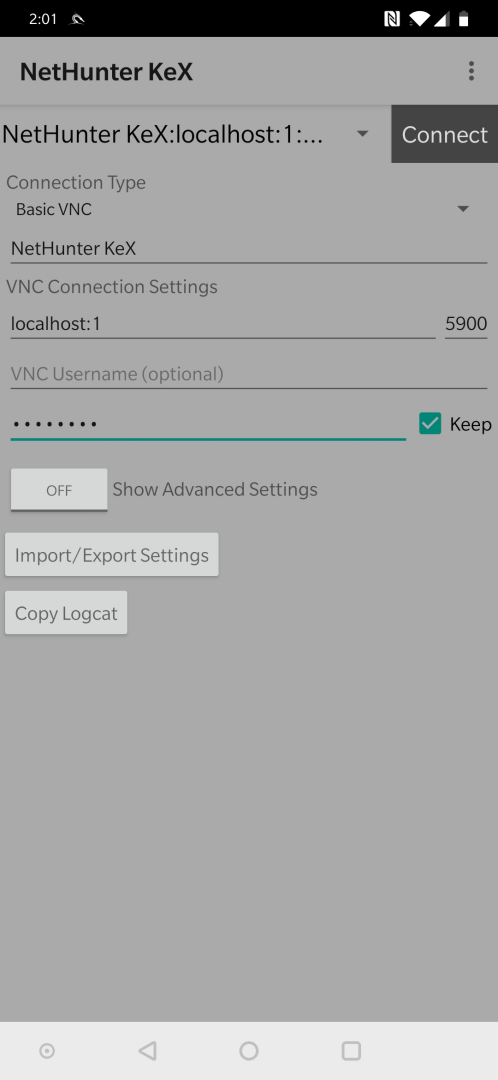
NetHunter KeX


Download


Customized version of bVNC for NetHunter KeX

Please support my hard work and GPL open-source software by giving me a high rating and telling all your friends about this project! You can also donate to the project by getting bVNC Pro.

If bVNC doesn't work for you, before writing a review, please post your question in the forum:
https://groups.google.com/forum/#!forum/bvnc-ardp-aspice-opaque-android-bb10-clients

See below for instructions for Windows, Linux, and Mac OS X.

If you need an RDP application, please search for aRDP in Google Play. In addition, a SPICE client named aSPICE is available. Finally, if you are an oVirt, RHEV, or Proxmox user, check out Opaque.

bVNC is a secure, open source VNC client. Its features include:
- Windows, Mac, Linux, BSD, or any other OS with a VNC server installed
- Master password support in the Pro version
- Multi-factor (two-factor) SSH authentication in the Pro version
- Multi-touch control over the remote mouse. One finger tap left-clicks, two-finger tap right-clicks, and three-finger tap middle-clicks
- Right and middle-dragging if you don't lift the first finger that tapped
- Scrolling with a two-finger drag
- Pinch-zoom
- Force Landscape, Immersive Mode, Keep Screen Awake
- Dynamic resolution changes, allowing you to reconfigure your desktop while connected, and control over virtual machines from BIOS to OS
- Full rotation - use the central lock rotation on your device to disable rotation
- Multi-language
- Full mouse support
- Full desktop visibility even with soft keyboard extended
- SSH tunneling, AnonTLS and VeNCrypt for secure connections (does not support RealVNC encryption).
- High-grade encryption superior to RDP using SSH and VeNCrypt (x509 certificates and SSL), preventing man-in-the-middle attacks
- AutoX session discovery/creation like NX client
- Tight and CopyRect encodings for quick updates
- Ability to reduce the color depth over slow links
- Copy/paste integration
- Samsung multi-window
- SSH public/private (pubkey)
- Importing encrypted/unencrypted RSA keys in PEM format
- Zoomable, Fit to Screen, and One to One scaling modes
- Two Direct, one Simulated Touchpad, and one Single-handed input modes
- In single-handed input mode, long-tap to get a choice of clicks, drag modes, scroll, and zoom
- Supports most VNC servers including TightVNC, UltraVNC, TigerVNC, and RealVNC
- Supports Mac OS X built-in remote desktop server (ARD) and Mac OS X authentication
- Does NOT support RealVNC encryption (use VNC over SSH or VeNCrypt instead)
- Stowable on-screen keys
- Right-click with Back button
- D-pad for arrows, rotate D-pad
- Hardware/FlexT9 keyboard support
- View-only mode
- On-device help on creating a new connection in the Menu when setting up connections
- On-device help on available input modes in the Menu when connected
- Hacker's Keyboard is recommended

thumbnail

Termux:Boot 0.7 APK


Download


                                              Termux:Boot 0.7 APK Info :

Download Termux:Boot 0.6 APK For Android, APK File Named And APP Developer Company Is Fredrik Fornwall . Latest Android APK Vesion Termux:Boot Is Termux:Boot 0.6 Can Free Download APK Then Install On Android Phone.

Download Termux:Boot 0.7 APK Other Version

For Download Other Termux:Boot versions Visit Termux:Boot APK Archive.
Download Termux:Boot.apk android apk files version 0.7 Size is 9723 md5 is 3ad1cca64502954d729f98e27912b2a6 By Fredrik Fornwall This Version Need Lollipop 5.0 API level 21 or higher, We Index Version From this file.Version code 7 equal Version 0.7 .You can Find More info by Search com.termux.boot On Google.If Your Search termux,boot,tools,termux:boot Will Find More like com.termux.boot,Termux:Boot 0.7 Downloaded 12 Time And All Termux:Boot App Downloaded Time. The Termux:Boot add-on provides functionality to run programs under Termux when the device boots up. Usage: - Start the Termux:Boot app once by clicking on its launcher icon. This allows the app to be run at boot. - Create the ~/.termux/boot/ directory. - Put scripts you want to execute inside the ~/.termux/boot/ directory. - If there are multiple files, they will be executed in a sorted order. - Note that you may want to run termux-wake-lock as first thing if you want to ensure that the device is prevented from sleeping. Example: To start an sshd server and prevent the device from sleeping at boot, create a file at ~/.termux/boot/start-sshd containing the two lines: termux-wake-lock sshd Join the Termux Google+ community: https://termux.com/community Report issues: https://github.com/termux/termux-boot/issues
thumbnail

Shodan.io App


Download


io.shodan.app


Shodan.io App

[!] the CAMERA permission is not needed anymore but was used to flash your QR code on Shodan.io. *** NOTHING MORE ***

[!] In order to use the App and have your API key, create on account on shodan.io and get your API key there.

Using your API key, this application allows you to explore data gathered by Shodan.io in order to discover exposed services all over the Internet. 
Search for specific terms or any popular queries and start browsing connected devices.

Privacy policy: https://github.com/PaulSec/Shodan.io-mobile-app/blob/master/privacy_policy.md